Email Authentication: SPF, DKIM & DMARC
SPF defines authorized senders. DKIM provides a cryptographic signature. DMARC enforces policy when either check fails. Configuration sequence matters: here's what each record does and what each state produces.
A domain's email authentication configuration determines whether receiving mail servers can verify that a message originated from an authorized source. Three DNS records govern this: SPF lists the IP addresses and services authorized to send as your domain; DKIM attaches a cryptographic signature to each outbound message; and DMARC defines the policy when either check fails. Without DMARC enforcement, receiving servers have no instruction from your domain on how to handle unauthenticated senders, including senders using your domain in the From field.
For businesses that depend on email, including marketing campaigns, transactional confirmations, and password resets, the authentication layer has a direct deliverability dimension. Inbox providers weight domain reputation signals when routing mail. A domain associated with unauthenticated sending patterns will see degraded deliverability across all outbound email from that domain, not only the unauthenticated messages.
SPF, DKIM, and DMARC each have a distinct role and a required configuration sequence. DMARC enforcement depends on SPF and DKIM alignment being in place first: setting p=reject before the sending source inventory is aligned causes legitimate email to fail authentication. The rest of this post covers what each record does, what each configuration state produces, and how to reach full enforcement without disrupting deliverability.
The Three Records Your Email Deliverability Depends On
Each record lives in your domain's DNS, the same place your website's address, nameservers, and MX records live. They work as a stack: SPF and DKIM are the authentication layers, and DMARC is the policy that tells receiving mail servers what to do when authentication fails.
SPF
Your authorized sender list
A TXT record at your root domain that lists which mail servers are allowed to send email for you. Receiving servers check this before accepting a message.
DKIM
A tamper-proof signature
A cryptographic signature attached to each outbound message by your mail platform. Proves the email wasn't forged or modified in transit.
DMARC
The enforcement policy
A TXT record that tells receiving mail servers what to do when a message fails SPF or DKIM: ignore it, send it to spam, or reject it outright.
The three records are interdependent. DMARC enforcement only works if SPF and DKIM are configured correctly first. Getting to full protection requires doing them in the right order, and understanding what breaks at each step if you skip ahead.
What Actually Happens Without SPF
SPF is your domain's authorized sender list. Without it, there is no list. Any mail server anywhere in the world can send email claiming to be from your domain, and receiving mail servers have nothing to check against. The check doesn't fail. It doesn't happen.
Domain with SPF
include:klaviyo.net in the recordDomain without SPF
The qualifier at the end of the SPF record determines how receiving servers treat senders not on the list. ~all (softfail) marks unauthorized senders as suspicious but still allows delivery. -all (hardfail) instructs receiving servers to treat unauthorized senders as unauthorized. SPF authorization is defined by the record's include mechanisms; enforcement behavior is set by the qualifier.
SPF has a structural constraint: only one SPF record is permitted per domain. Klaviyo, Shopify, Mailchimp, and other sending platforms each instruct users to add their SPF include to the existing record. Adding a new TXT record instead of editing the existing one produces two SPF records in DNS. Two SPF records result in PermError: authentication fails for every message from every sender, regardless of whether the source is authorized.
The PermError problem
v=spf1 include:_spf.google.com ~allv=spf1 include:spf.klaviyo.com ~allTwo SPF records = PermError = authentication fails completely
The fix: one SPF record with all sending sources as include: mechanisms. v=spf1 include:_spf.google.com include:spf.klaviyo.com -all
How DKIM Proves an Email Came From You
Think of a wax seal on a letter. A signet ring creates a seal that's unique to the sender. The recipient can look at it, recognize it, and know the letter came from you and wasn't tampered with after it was sealed. DKIM works the same way, using mathematics instead of wax.
Every time your mail platform sends an email on your behalf, it signs the message using a private key that only it controls. The signature is attached to the email's headers. When the message arrives, the receiving mail server checks your DNS for the corresponding public key and uses it to verify the signature. If it checks out, the email is confirmed to have come from your authorized platform and hasn't been modified in transit.
Your mail platform holds a private key, a secret number that only it knows
When it sends a message, it uses that key to generate a unique signature from the message content
The signature is attached to the email as a DKIM-Signature: header
Your DNS publishes the public key at a subdomain like klaviyo._domainkey.yourdomain.com — anyone can read it
The receiving mail server fetches the public key from your DNS
It verifies the signature using the public key — confirming the message came from your authorized platform and wasn't modified after signing
The public/private key relationship
Private key
Stays on your mail server. Used to sign outgoing messages. Never published. If this is compromised, rotate immediately — generate a new key pair under a new selector.
Public key
Published in your DNS. Used by receiving servers to verify signatures. Anyone can read it — that's the point. It only lets you verify, not sign.
DKIM has one important advantage over SPF: it survives simple email forwarding. SPF checks the IP address of the sending server. When an email is forwarded, the IP changes to the forwarding server's IP, and SPF fails — even if the original message was fully legitimate. DKIM's signature travels with the message and remains valid as long as the headers and body aren't modified in transit. This is why DKIM alignment is more reliable for direct forwarding scenarios — sales tools, executive assistants forwarding from one account to another. Mailing lists are a different case: list servers frequently append footers, modify Subject lines, or rewrite Reply-To headers, which invalidates the DKIM signature.
DKIM key rotation
DKIM keys should be rotated periodically — M3AAWG recommends at least every six months, and more frequently for high-security environments. The safe way: deploy the new key under a new selector while the old selector is still active, verify the new selector is passing in DMARC aggregate reports, then retire the old one. Never delete the old key before confirming the new one is working.
Why Flipping Straight to p=reject Will Break Your Email
p=reject instructs receiving mail servers to reject any message from your domain that fails authentication at the SMTP layer — the message never reaches the inbox. That behavior is the goal. The prerequisite is that every legitimate sending source is aligned under SPF and DKIM before the policy goes live.
If Shopify, Klaviyo, Mailchimp, Postmark, or any other sending platform isn't in your SPF record and DKIM-signed before p=reject is set, those platforms' mail fails authentication. Order confirmations, shipping notifications, abandoned cart sequences, and password resets route through those platforms — each unauthenticated source becomes a deliverability failure under p=reject.
What p=reject does to unauthenticated email
If a message from your domain fails authentication and your policy is p=reject, it doesn't reach the inbox. There's no notice to the recipient. When the rejection happens at the SMTP layer, the sending platform receives a delivery failure — but that failure routes to the ESP's bounce handling, not your inbox. In post-SMTP enforcement, there's no notification at all. Either way, the customer who was expecting an order confirmation sees nothing.
The purpose of p=none — the monitoring mode — is not to be a permanent destination. It's to give you time to build a complete picture of every source sending email as your domain before enforcement goes live. DMARC sends aggregate reports to whichever address you configure in the rua= field. Those reports, parsed and reviewed, tell you which senders are passing authentication and which are failing — before you do anything that would block them.
Organizations that stay at p=none indefinitely have typically left aggregate reports unread, left SPF and DKIM alignment unfinished, and accumulated a sending source inventory that will cause failures the moment enforcement goes live. The monitoring phase exists to close those gaps before they become enforcement problems.
A Quick Self-Check: Where Does Your Domain Stand?
Three records, three states each. Here's what each state means for your deliverability and your exposure.
SPF
No SPF record at all. Any mail server can send as your domain. No authentication check occurs.
Unauthorized senders are flagged as suspicious but mail still delivers. Common configuration, often mistaken for protection.
Unauthorized senders are treated as unauthorized. This is the configuration required before advancing to p=reject.
DKIM
No DKIM signature on outbound mail. Forwarded email will fail authentication. DMARC enforcement will break forwarded messages.
Signing is active but the signing domain doesn't match the From: domain. DMARC alignment check fails.
Signing active, signing domain matches From: domain. DMARC alignment passes on DKIM.
DMARC
No DMARC policy. Receiving servers apply their own defaults. No aggregate reports, no visibility, no enforcement.
Monitoring mode. Reports are sent. Nothing is blocked. A valid starting state — not a valid end state.
Enforcement active. Unauthorized mail is quarantined or rejected. Reached safely only after SPF and DKIM are fully aligned.
Check your domain in under a minute
FEDLIN's free domain scanner checks your DMARC policy, SPF record, and DKIM presence and shows you exactly what needs attention.
Run a free domain check at fedlin.com/scan/The Staged Path to Enforcement
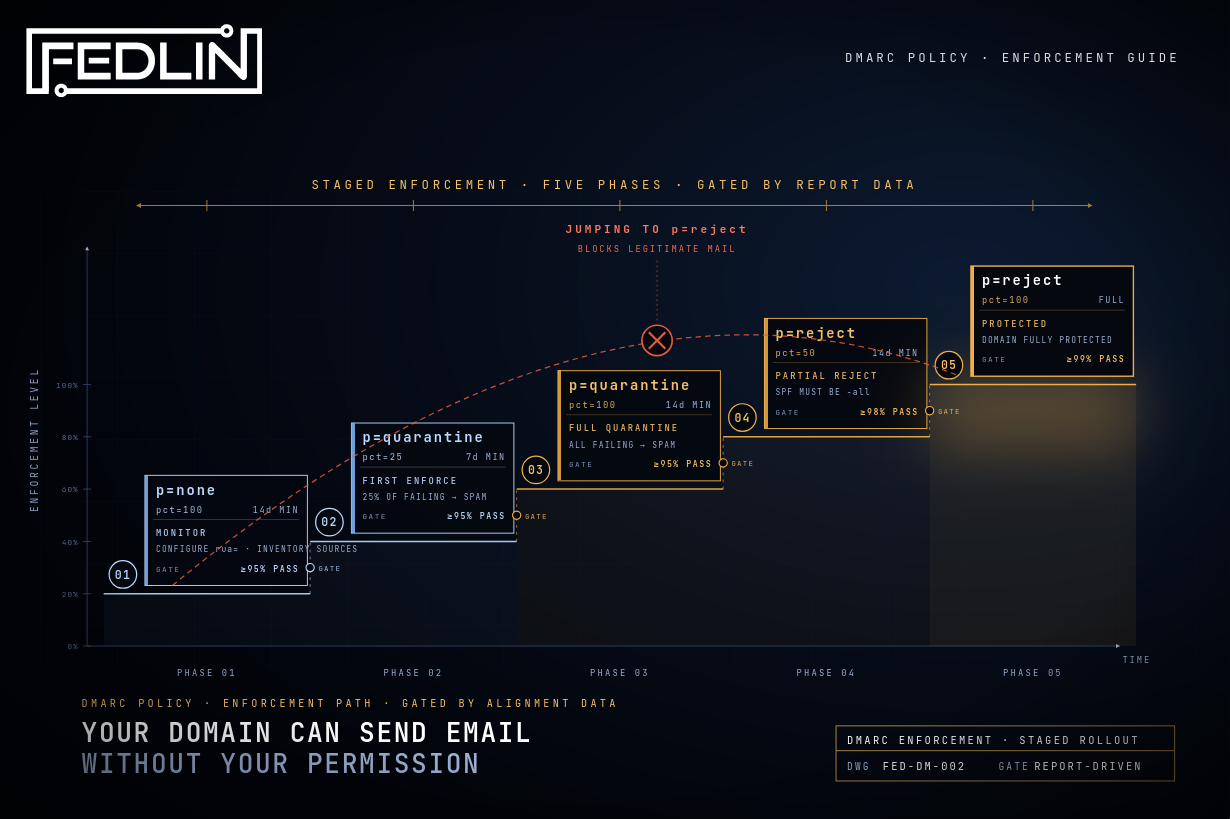
Moving from no enforcement to p=reject safely requires a phased approach gated on real data — not calendar dates. Each phase has a minimum hold time and an alignment threshold derived from DMARC aggregate reports. The threshold must be met before advancing. The logic is simple: if 5% of your email is failing authentication, you haven't finished aligning your sending sources, and enforcing now means losing 5% of your legitimate mail.
p=none pct=10014 days minMonitoring only. Configure aggregate reports (rua=). Identify every source sending as your domain. Align SPF and DKIM before advancing. Gate: ≥95% pass rate in reports.
p=quarantine pct=257 days min25% of failing messages go to spam. First enforcement signal. Surfaces any sources that were missed in Phase 1. Gate: ≥95% pass rate.
p=quarantine pct=10014 days minAll failing messages to spam. Legitimate email that's still failing becomes visible in spam folders — gives time to find and fix remaining sources. Gate: ≥95% pass rate.
p=reject pct=5014 days minHalf of failing messages rejected outright. SPF must be -all (hardfail) before this phase — ~all is insufficient. Gate: ≥98% pass rate.
p=reject pct=100Full enforcementAll unauthorized mail rejected at SMTP layer. Gate: ≥99% pass rate before advancing. At this point your domain is fully protected.
"p=none serves one purpose: build a complete inventory of every source sending as your domain before enforcement decisions make any gap permanent."
Each phase gate is driven by verified alignment percentages from DMARC aggregate reports, not by arbitrary wait times. The gating prevents common mistakes — like advancing to p=reject while a third-party sending source is still misaligned, which would block its mail silently.
The phased model is how fedlin.com itself reached full enforcement — the same process used for client domains. Phase 1 monitoring is also where configuration errors get caught before they matter. A real example: a client domain reached out for deployment with two SPF records in DNS — a PermError condition that was silently breaking authentication for all their email. That was caught and resolved during Phase 1, before any enforcement policy was in place to cause damage.
Sources
Not sure where your security posture stands?
Start with a scoping call. We map your exposure across web, email, credential, AI, and breach history, and sequence the work into a prioritized plan with a Year 1 roadmap, built around what your architecture requires.
Subscribe to Security Insights
Get enterprise security tips, compliance guides, and best practices delivered to your inbox.