CSP Nonces vs Hashes: Why We Use Cloudflare Workers for Dynamic Script Protection
Hash-based CSP can break on every deploy. How nonces solve that, and how edge computing makes it practical, with sources from MDN, Astro, and Cloudflare.
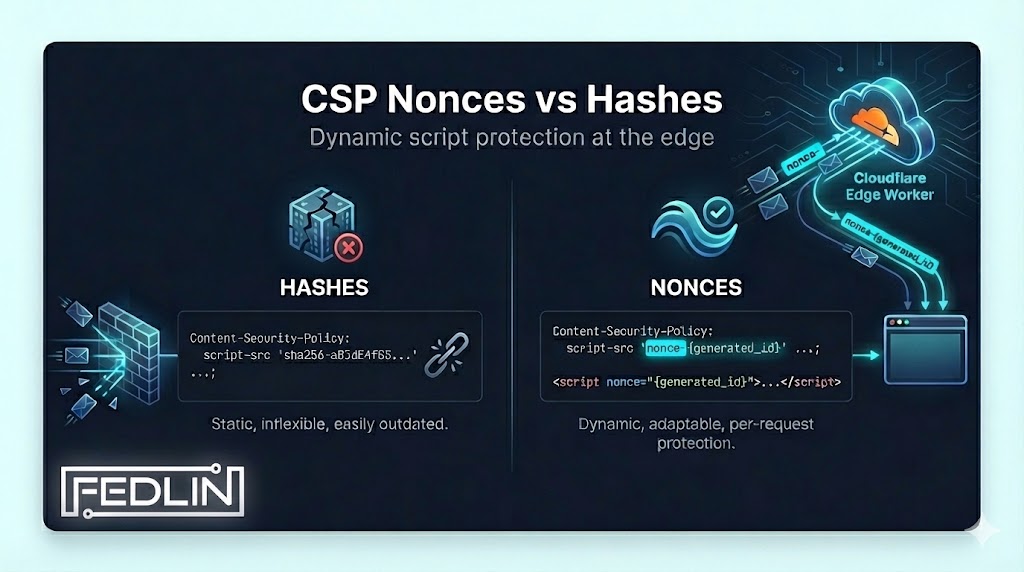
When Security Policies Break Your Build
You're a full-stack engineer. You've got a feature to ship. You write the code, test it locally, everything works. You deploy. Then the security policies kick in, and suddenly your analytics script is blocked. Your third-party widget won't load. Your inline styles are stripped. You spend the next three hours chasing CSP violations, adding exceptions, trying to figure out which hash or nonce you're missing.
You fix one thing, break another. The security policy is fighting your application's actual functionality. You're not building features anymore. You're wrestling with configuration. And every time you think you've got it, a new edge case breaks in production.
Security policies that aren't tuned to your application's real behavior tend to keep breaking things. This post explains the tradeoffs between hash-based and nonce-based CSP, what frameworks and platforms document, and how edge computing can deliver nonces without changing application code.
Security policies tend to work better when they match your application's actual functionality (which scripts load, where styles come from, what third-party services are used) rather than a generic template. At FEDLIN we tune policies to the client's real behavior: we scan the live domain, map scripts and styles, then craft policies that lock down vulnerabilities without breaking functionality. The approach below, nonces at the edge via Cloudflare Workers, is one way to get strict CSP without touching application code; the citations link to the sources that define and support it.
The CSP Dilemma: Security vs. Maintainability
Content Security Policy (CSP) is a mechanism that lets developers control which resources a page can fetch or execute, helping protect against cross-site scripting (XSS) attacks. MDN notes that when an attacker injects malicious JavaScript, CSP tells the browser not to execute it, but to allowlist legitimate scripts you need either a nonce-source or a hash-source; 'unsafe-inline' allows all inline scripts and is considered a security risk. [MDN, script-src]
Most applications use inline scripts: a <script> tag in HTML, an analytics snippet, or framework-generated hydration code. By default, CSP blocks all inline scripts unless you allowlist them. The standard gives you two main mechanisms:
SHA-256/384/512 hash of the exact script content. Must be recalculated on every change.
Random token generated per-request. Script executes if its nonce attribute matches the header.
Both are specified in CSP Level 3 and supported by modern browsers. In production environments with CI/CD and frequent deployments, hash-based CSP often creates operational friction; the tradeoffs are well documented. [W3C CSP3]
Why Hash-Based CSP Can Break Your Workflow
With hash-based CSP you specify allowed scripts using file hashes (e.g. script-src 'sha256-…'). MDN states that "when generating the hash, don't include the <script> tags and note that capitalization and whitespace matter, including leading or trailing whitespace." That leads to several practical issues:
- Build-time coupling: Your CSP header must be regenerated every time any inline script changes. This ties your security configuration to your build process.
- Whitespace sensitivity: A single space, newline, or formatting change invalidates the hash. Prettier reformatted your code? CSP broken.
- Third-party scripts: Analytics, chat widgets, and other third-party scripts update without notice. Your hash stops matching.
- Dynamic content: Server-rendered pages with user-specific data generate different script content per request. Hashing is impossible.
Astro's experimental CSP feature (added in 5.9) uses hashes by default and notes that "inline scripts are not supported out of the box, but you can provide your own hashes for external and inline scripts." For static or pre-rendered sites, hashes are the built-in option; nonces require a server or edge layer to generate a value per request. [Astro, experimental CSP] When the maintenance burden of hashes becomes unmanageable, teams sometimes relax policy to 'unsafe-inline', which weakens the security benefit.
Nonces: The Dynamic Alternative
A nonce ("number used once") is a cryptographic value that allows allowlisting specific inline script elements without using 'unsafe-inline'. MDN specifies that the nonce must be generated with a cryptographically secure random generator, be at least 128 bits, and be different for each page load. The same value goes in the CSP header (script-src 'nonce-…') and in each allowed script's nonce attribute. Here's the flow:
abc123xyz script-src 'nonce-abc123xyz' <script nonce="abc123xyz"> Nonces decouple CSP from script content: you can change script body without recalculating hashes, as long as the script tag carries the current request's nonce. Injected scripts won't have that value because the attacker doesn't know the per-response nonce. [MDN, nonce]
💡 Security note: Nonces must be cryptographically random and unique per response. Reusing nonces defeats the mechanism: an attacker who obtains one nonce could inject scripts into any response using that same nonce.
The Implementation Challenge
Implementing nonces traditionally requires a server or edge to generate a value per request and inject it into both the HTTP header and every inline script tag. That creates friction for many setups:
- Application code changes: Your server must generate nonces and inject them into both the HTTP header and every inline script tag. This touches routing, templating, and middleware.
- Framework integration: React, Next.js, Vue, and other frameworks generate their own inline scripts. You need framework-specific solutions.
- Static site limitations: Pre-rendered static sites don't have a server to generate per-request nonces; the HTML is the same for every visitor. Astro's docs describe this constraint: their experimental CSP uses hashes, and nonces would require a server/edge to rewrite HTML per request. [Astro]
Teams often either stick with hashes (and the maintenance burden) or relax to 'unsafe-inline'. An alternative is to generate and inject nonces at the edge, without changing the origin application.
Edge Computing: Cloudflare Workers
Cloudflare Workers run at the edge between your origin and the client. The HTMLRewriter API lets you parse and transform HTML in a streaming way: "a jQuery-like experience inside your Workers application," using selectors and handlers to modify elements. [Cloudflare, HTMLRewriter] That makes it possible to intercept each response and:
- Generate a fresh nonce for each response using cryptographically secure randomness.
- Parse and modify HTML to inject the nonce attribute into all
<script>tags. - Add the CSP header with the matching nonce value before sending the response to the client.
✓ Result: Origin application code can stay unchanged. A static site can use dynamic nonces. The Worker generates a nonce, injects it into <script> tags via HTMLRewriter's setAttribute, and adds the CSP header before sending the response. [Cloudflare, modify response]
Workers run at Cloudflare's edge globally; transformation is streaming and typically adds minimal latency. The pattern works for any origin (static sites, Next.js, Astro, or legacy apps) because the Worker operates on the response body and headers without requiring framework-specific integration.
Why This Matters for Enterprise Security
When enterprise security teams evaluate your application, they're looking at your CSP header. Here's what they see:
- •
'unsafe-inline'in script-src - • No CSP header at all
- •
'unsafe-eval'present - • Overly permissive policies
- • Nonce-based script protection
- • Strict default-src policy
- • No unsafe directives
- • Report-uri for monitoring
A properly configured nonce-based CSP (no 'unsafe-inline' in script-src) is what many enterprise security reviews look for. The same headers that tools like Mozilla Observatory and securityheaders.com score are the ones evaluators often check.
This is part of what FEDLIN covers in Edge Security: tuning CSP, HSTS, and related response headers against your application's real behavior so the policy passes audits without breaking functionality.
Sources
Standards, official documentation, and community posts cited in this article. Inline links in the text point to the same or related resources.
- MDN, Content-Security-Policy: script-src directive
- MDN, HTML nonce global attribute
- MDN, Content Security Policy (CSP) guide
- W3C, Content Security Policy Level 3
- Astro, Experimental Content Security Policy (CSP)
- Cloudflare, Workers: Get started
- Cloudflare, HTMLRewriter API
- Cloudflare, Modify response example
- Cloudflare Blog, Introducing the HTMLRewriter API to Cloudflare Workers (Rita Kozlov, Nov 2019)
- Scott Helme, CSP nonces the easy way with Cloudflare Workers
Nonce-based CSP at the edge
The approach above is what we use for clients who need strict CSP without changing application code. If that's the kind of setup you're after, we implement it as part of our Edge Security work, and you can check your current headers using our free scanner.
The Bottom Line
Hash-based CSP is specified by the standard and supported by frameworks like Astro's experimental CSP, but hashes must be updated whenever script content changes and are sensitive to whitespace, which can make them brittle in fast-moving codebases. Nonce-based CSP avoids that coupling but traditionally requires the server to generate and inject the nonce per request. Edge runtimes like Cloudflare Workers, with APIs such as HTMLRewriter, can perform that injection without modifying the origin application. The sources above document the spec, browser behavior, framework options, and the Worker APIs that make this pattern possible.
At FEDLIN we use this approach for clients who need strict CSP without app changes; the links in this post point to the documentation and standards that define it.
Is your edge policy doing what you think it is?
Headers are one layer. FEDLIN tunes CSP, security headers, WAF rules, and origin controls to your application's real behavior, then verifies the policy holds in production, not just in a config file.
Subscribe to Security Insights
Get enterprise security tips, compliance guides, and best practices delivered to your inbox.